
Hi, I’m Higashi.
Keras and PyTorch are commonly used to build deep learning models.
In Keras, you can run a trained model with a call like this:
model.predict ( input data )
That requires Keras to be available where you run the prediction.
Sometimes I can train a model in Keras, but the environment where I need to run it only has NumPy.
Here’s how to run this trained model in NumPy.
A similar approach may work for equivalent layers in a PyTorch model.
Let’s get started!
What a dense neural network calculates
What happens inside a dense layer?
It multiplies the input by a weight matrix, adds a bias, and applies the activation configured for that layer.
Once we have the trained parameters, NumPy can reproduce these operations.
I explain how to retrieve the parameters in this article:
Here I’ll use them to reproduce the model’s predictions.
Build a sample Keras model
First, I’ll train a small multilayer perceptron (MLP) in Keras.
Here’s the data for the model.
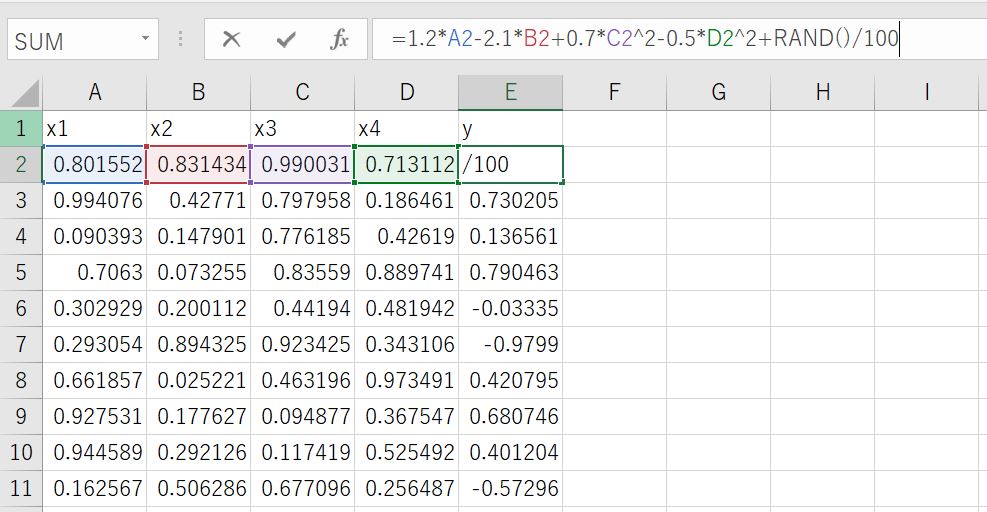
The following equation generates the target value y:
y=1.2*x1-2.1*x2+0.7*x3^2-0.5*x4^2+random number
The four inputs are x1, x2, x3, and x4.
I saved the data as sample_data.csv.
The code below builds and trains the MLP.
#Import Library
import matplotlib.pyplot as plt
import numpy as np
import pandas as pd
from tensorflow.keras.models import Sequential
from tensorflow.keras.layers import Dense
from tensorflow.keras.optimizers import Adam

#Data Preparation
data_file='sample_data.csv'
data=pd.read_csv(data_file).values
Xdata=data[:,:4]
Ydata=data[:,-1]

#Model Build and Learning
model = Sequential()
model.add(Dense(20, input_dim=4))
model.add(Dense(10))
model.add(Dense(1))
model.compile(loss="mean_absolute_error", optimizer=Adam(lr=0.001))
model.summary()
validation_split_rate=0.2
history=model.fit(Xdata,Ydata,batch_size=16,epochs=100,validation_split=validation_split_rate)
The trained model is stored in model.
Retrieve the weights and biases
The weights are the values in the matrix used for multiplication.
The biases are the values added afterward.
This MLP has three dense layers, each with a weight matrix and a bias vector.
Here’s how to retrieve them.
#First Layer's Process
layer1 = model.layers[0]
L1_weights=layer1.get_weights()[0]
L1_bias=layer1.get_weights()[1]
#Second Layer's Process
layer2 = model.layers[1]
L2_weights=layer2.get_weights()[0]
L2_bias=layer2.get_weights()[1]
#Third Layer's Process
layer3 = model.layers[2]
L3_weights=layer3.get_weights()[0]
L3_bias=layer3.get_weights()[1]
Next, check the shape of each array.
print('First_Weight_Shape=', L1_weights.shape)
print('First_Bias_Shape=', L1_bias.shape)
print('Second_Weight_Shape=', L2_weights.shape)
print('Second_Bias_Shape=', L2_bias.shape)
print('Third_Weight_Shape=', L3_weights.shape)
print('Third_Bias_Shape=', L3_bias.shape)
Here’s the output.
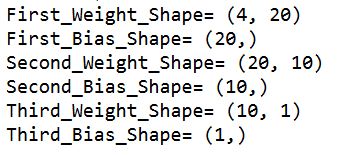
For reference, these are the layers in the model:
model.add(Dense(20, input_dim=4))
model.add(Dense(10))
model.add(Dense(1))
The array shapes match the input and output sizes of the layers.
For more detail on extracting these arrays, see the following article:
[AI] Get the Weights and Biases of a Trained Keras MLP
Reproduce the model with NumPy
Now I’ll use the weights and biases to calculate the output of each layer.
Here’s the sample code.
#List for output
Pred_mat=[]
#Calculation of matrix products and sums
for i in range(len(X_validation)):
    input_data=X_validation[i,:].reshape(1,4)
    L1P=np.dot(input_data,L1_weights)+L1_bias
    L2P=np.dot(L1P,L2_weights)+L2_bias
    L3P=np.dot(L2P,L3_weights)+L3_bias
    Pred_mat.append(L3P)
The code applies the operations in the same order as the model.
Compare the results with Keras
Let’s compare the NumPy results with model.predict().
Here’s the comparison plot.
The horizontal axis shows the Keras predictions.
The vertical axis shows the predictions computed with NumPy.
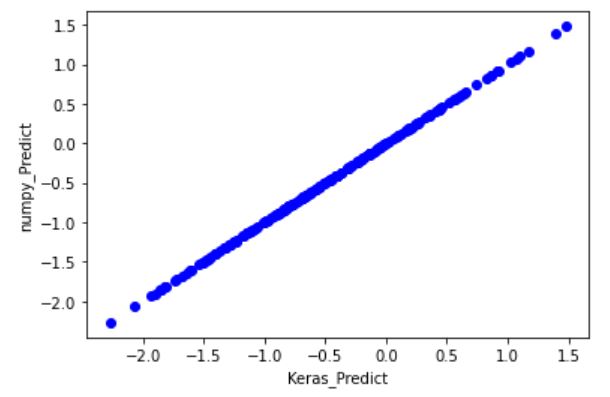
The values agree in this comparison.
You can save the trained weights and biases as NumPy arrays and use them to run this MLP in an environment that has NumPy.
I find this useful when the training and deployment environments differ.


コメント